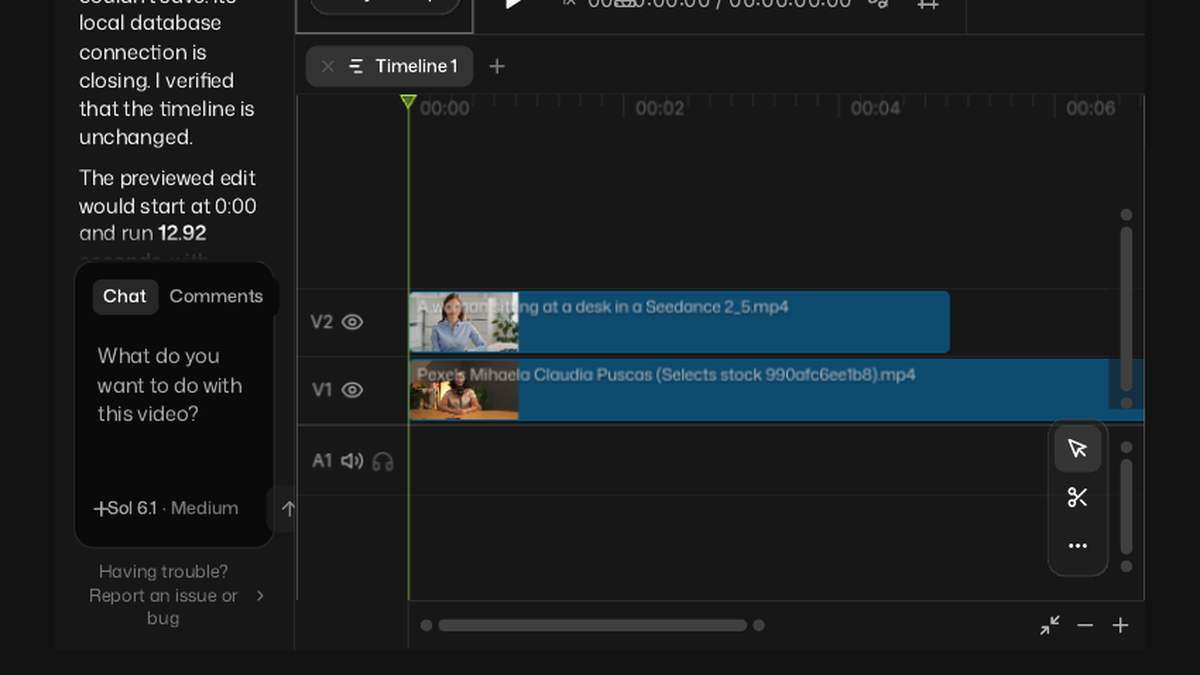
I signed up for Selects expecting a desktop download. Its own site says so plainly: no browser version, Mac or Windows only. Then the web app loaded in my browser, the editor opened, and the chat assistant trimmed my clip exactly as I asked. That contradiction runs through the whole test. Selects is a real editor with a real chat assistant, and it is also a product whose own pages disagree with what it does.
Here is the short version. The free plan hands you 1,800 credits, the AI assembly edit works, and a five-second Seedance clip rendered in about three minutes. Local file import, captions, and export all stalled in my test, and two of those three failures look like limits of the automated browser I tested in, not proven faults in Selects. I can recommend the free plan as a way to try chat editing. I cannot call it a finished workflow until those three steps are verified on a normal machine.
What Is Selects?
Selects, from Cutback, is an AI video editor for podcast, interview, talking head, and event footage. You drop in raw footage, it analyses the words, the speakers, and what is on screen, then it assembles a draft edit you can direct in chat or change by hand on a multi-track timeline. When the cut is ready, it hands a structured project to Adobe Premiere, Final Cut Pro, DaVinci Resolve, or Avid Media Composer. It also works with Claude through MCP, so you can drive it from an agent. The tool launched in 2025 and the current version is 3.0.
Two things matter before you sign up. First, the pricing page and the help center describe a full editor on the free plan, with no card required. Second, several pages on Selects own site still say it is desktop only, for Apple Silicon Macs and Windows 11, with no browser version yet. I tested the web app at app.tryselects.com in a browser, and it loaded and ran without any download. Keep that mismatch in mind: the marketing pages and the product do not agree, and the product is the one I tested.
Hands-On Test: How Selects Actually Performed
In line with our editorial testing policy, I signed up by email with no credit card required, skipped the two optional onboarding questions, and landed on the welcome screen offering 1,800 free credits (described as enough to analyse up to five hours of video or generate up to 175 seconds of clips). I claimed the credits and opened a new project.

The first test was the AI assembly edit, and it worked. I gave the chat assistant a written prompt: move the clip to 0:00, trim two seconds from each end, cut silences, add captions. It moved the clip to the start and trimmed exactly two seconds from each end, taking the timeline from 16.92 seconds to 12.92 seconds. The assistant checked its own work and reported that the stock clip had no audio track, so there was no speech to caption and no silence to cut. That honesty is worth noting: it did what the footage allowed and said so. The edit cost 142 credits and took about five minutes of wall time across two runs, with a reload in between.
The second test was AI video generation, and it worked too. I asked Seedance 2.5 for a five-second, 720p clip of a woman at a desk saying a test line to camera. It rendered in about three minutes and landed on the timeline as a second video track after a reload. The quoted price was 230 credits; the actual charge was 210 credits. The model list also shows Veo 3, Sora 2, Runway, and Luma behind the Pro plan.

Three tests did not complete, and I need to be precise about why. Local file import uses the browser file picker, which this automated browser refused, so my prepared 18-second narrated sample could not be uploaded at all. That means the transcript accuracy check I planned never ran. Captions failed twice because media analysis failed twice, with no transcript produced, and the transcript panel stayed empty. Export failed twice in the FHD export dialog, immediately both times. Two of these failures line up with the browser’s own problems during the session: its local database kept failing to save, and the preview canvas stayed black because no graphics adapter was available. So I am not calling captions or export broken. I am saying they are unverified in this test, and they need a normal Chrome session to settle.
Free Plan vs. Real Pricing (And Hidden Limits)
The free plan is genuinely free to start: no card, a full editor, and 1,800 trial credits granted once. The catch is that the trial credits are linked to the device, not the account, so a second signup on the same machine does not get a fresh 1,800. Monthly plan credits do not roll over. Analysis costs 1 credit per 10 seconds of footage, and the trial covers about five hours of it.
| Plan | Monthly billing | Annual billing | Credits per month |
|---|---|---|---|
| Free | $0 | $0 | 1,800 trial credits, once |
| Starter | $20/month | $16/month ($192/year) | 3,600 |
| Pro | $100/month | $80/month ($960/year) | 14,400 |
| Pro Max | $200/month | $160/month ($1,920/year) | 36,000 |
| Team | $1,000/month | $800/month ($9,600/year) | 72,000 |
Annual billing saves 20 percent on every paid plan. Credit top-ups on paid plans cost $0.0167 per credit, or $0.0222 on Team. Per-model costs on the pricing page: Seedance 2.5 at 720p runs about 208 credits per five seconds, Veo 3 runs 360, Kling 4.0 at 720p runs about 141, and Higgsfield Genjutsu at 480p runs about 286. When credits run out, timeline editing, effects, and export keep working, because they do not use credits. Analysis, chat on Selects models, and generation pause.


The terms carry a few flags. Subscriptions auto-charge monthly and auto-renew. The terms can be amended with deemed consent if you do not refuse before the effective date. The company may place ads and send information by email or phone. Abnormally high usage or account sharing can trigger restriction or deletion without refund. Account data is deleted within 72 hours of termination. Refunds run within seven days of payment, only if the paid service has not been used at all. The terms are governed by the law of the Republic of Korea and have been in force since 12 December 2024. One gap: the terms do not state plainly whether you may use your own edited outputs commercially. They reserve all rights in the service to the company and grant only a limited license, so I would not assume commercial use is covered without asking Cutback.
Pros
- Accurate chat editing: moved my clip to 0:00 and trimmed exactly two seconds from each end
- Runs in the browser: the web app works with no download, despite the site claiming desktop only
- Generous 1,800 free credits: enough for about five hours of analysis or 175 seconds of generated video
- Built-in video generation: Seedance 2.5 worked on the free plan and rendered in about three minutes
- Frictionless signup: took under a minute with a temp email and no verification code or card
Cons
- Stalled workflow steps: local file import, captions, and export failed or stalled in this browser test
- Unverified transcription: the transcript panel stayed empty after two failed analysis attempts
- Unclear commercial rights: the terms do not state plainly whether edited outputs may be used commercially
- Conflicting website docs: Selects own pages say desktop only while the web app runs in the browser
- Device-locked trial credits: no credit rollover on monthly plans, and a second account on the same machine gets no fresh trial
What Real Users Are Saying
Selects has a small but real review footprint. On G2 it scores 4.6 out of 5 from 10 reviews, checked 7 November 2026. I found no verified Trustpilot, Capterra, Product Hunt, or Reddit footprint in this pass, so the G2 sample is the whole independent picture, and ten reviews is a small base. Two reviews on the G2 page are marked as business partners of the seller or a competitor and are excluded from the scores.
The praise is consistent. Podcast editors say it saves real time: Paul T. wrote that it analyses full recordings, categorises the conversation, and lets him edit from the full transcript with a click. Barry N. said the AI is very good at taking several large files and creating shorts, focusing on the best shots, and that he usually does not have to edit the result at all. Dannison O. praised the visual analysis, which he said helps cut highlight reels for events, and the MCP update that lets him drive Selects from Claude. Billy L. said multicam editing and smart captioning saved weeks, not hours. Erick S. imported 23 hours of two-camera interview material and said transcription and classification worked well, with support in Spanish from a named human.
The complaints are consistent too. Several reviewers call the editor confusing and the manual timeline options limited. Jesse P., the lowest scored review I read at 3.5 out of 5, wrote that the interface seems to change every time he logs in, and that he once missed a deadline because the software was down. Erick S. imported 13 hours, left the app without enough credits to analyse, and found the project did not exist the next day because it had not been saved. Dannison O. noted there is no support for stills as B-roll, and Erick S. flagged magnetic timeline precision and MCP reconnects.
Who Should Use Selects (And Who Should Skip It)
Try Selects on the free plan if you cut talking head video, podcasts, or interviews and you want to direct the first assembly in plain words instead of dragging clips by hand. The chat edit I ran was accurate, the credit grant is generous, and the handoff to Premiere, Final Cut, or DaVinci fits editors who finish elsewhere. It is also worth a look if you want AI video generation without a subscription, since Seedance 2.5 rendered on the free plan.
Lottie AI Review
If your product needs vector UI micro-animations and Lottie files rather than video footage curation, see our Lottie AI review.
Skip Selects for now if your workflow depends on captions or transcript editing, because I could not verify either in this test. Skip it too if you need reliable export from a browser session, or if you need a clear commercial use grant in writing, since the terms do not give one plainly. And if you work on a machine where you cannot install the desktop app, test the web app yourself first: it worked for me, but the site’s own pages say it should not exist.
Frequently Asked Questions
Is Selects really free?
Yes, the free plan costs $0 and needs no card. It includes the full editor and a one-time grant of 1,800 trial credits, enough for about five hours of analysis. Those credits do not reset, and monthly plan credits do not roll over.
Does Selects add a watermark on the free plan?
I could not verify this. Export failed twice in my test, so no finished file was produced to inspect, and the captured pricing pages do not state a watermark. The export dialog offered 4K, FHD, and HD on the free plan.
How much does Selects cost per month?
Starter is $20 a month on monthly billing or $16 a month billed yearly. Pro is $100 a month monthly or $80 a month yearly, Pro Max is $200 a month monthly or $160 a month yearly, and Team is $1,000 a month monthly or $800 a month yearly.
Can you use Selects creations commercially?
The terms do not say so plainly. They give you a limited license to use the service, reserve all other rights to the company, and ban unauthorised commercial use of information obtained through the service. I would not assume commercial use is covered without asking Cutback.