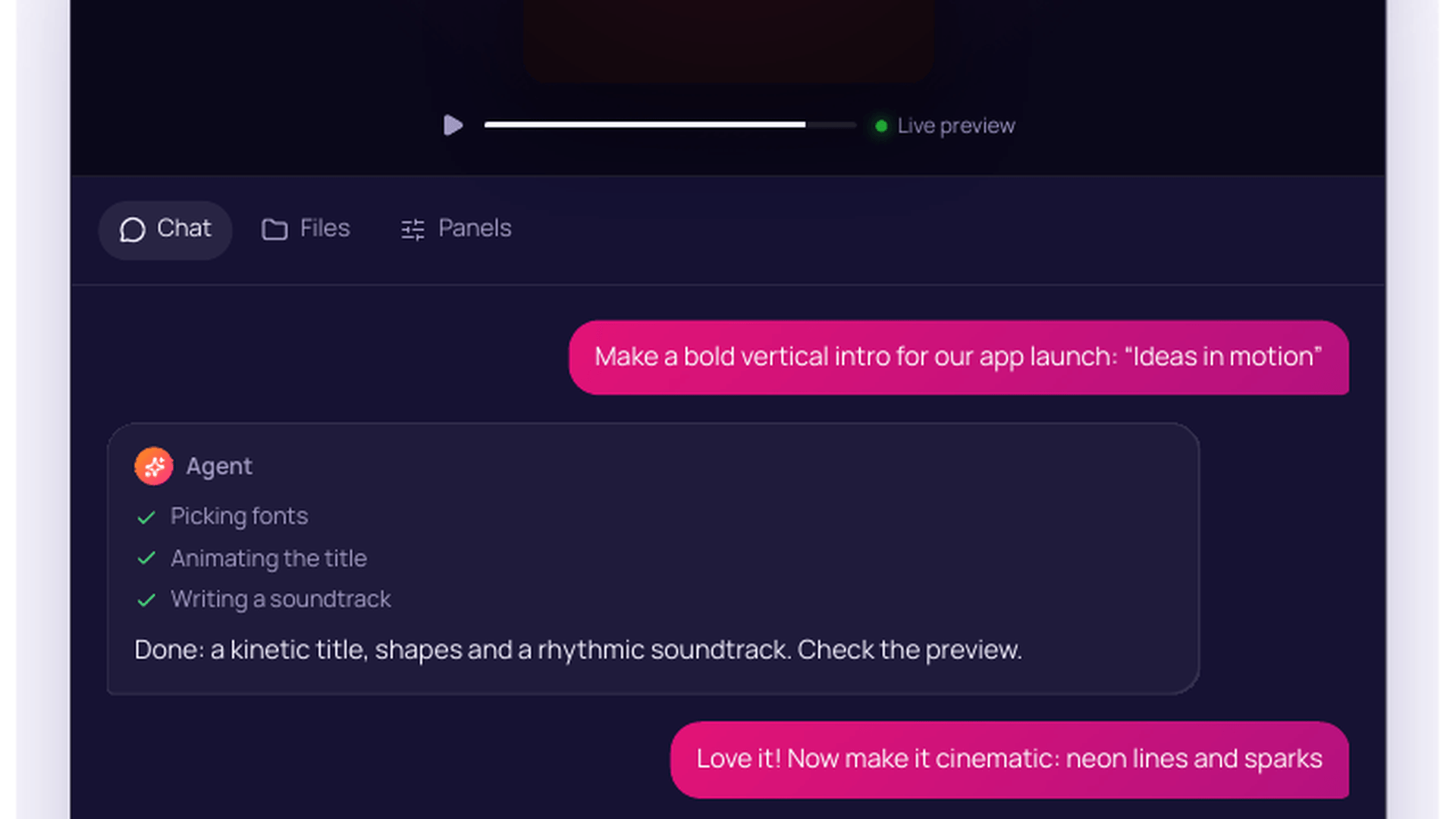
I tested Motion Fab on 14 November 2026 by describing two videos in chat and letting its agent animate them. I started as a guest with 300 credits and ended with 14 after two videos, two exports, and one music revision. My verdict is mixed. The finished motion graphics look good, kinetic type and a glowing 3D cube with a composed soundtrack, and the chat-driven workflow is genuinely different from a timeline editor. But the in-app preview stayed black the whole time, both exports carry a centre watermark, and 300 credits only stretch to about two full videos.
Motion Fab is worth a try if you want a quick vertical promo or teaser and you are happy to judge the result from the exported file, not the preview. It is not the tool to pick if you need many videos a month on the free plan, or if you need unwatermarked, 4K, or photorealistic video, because none of those are on the free tier.
What Is Motion Fab?
Motion Fab (motionfab.app) is a chat-driven AI motion designer. You describe a video in chat, pick a template, and an agent builds the animation in code, kinetic type, shapes, 3D effects, and sound, then you export an MP4. It is run by Tatiana Trukhanova, a sole proprietor in Berlin, Germany. It launched on Product Hunt on 10 November 2026 with 6 upvotes and 1 comment, and I found no scored independent reviews on G2, Trustpilot, Reddit, or X as of 14 November 2026. Judge it as a motion-graphics tool, not a photorealistic text-to-video generator: its output is animated type and wireframe 3D graphics, exactly what its templates promise.
Hands-On Test: How Motion Fab Actually Performed
In line with our editorial testing policy, no sign-up was needed to start. I worked as a guest with 300 starting credits, then signed in with Google later and the guest credits carried over to the account. The free Start plan refills to 100 credits a month, renewing 14 December 2026, and the terms say the refill replaces any remaining credits, so there is no rollover.

My first task was a Simple Motion app promo for UnboxedAI.tech, headline plus the bullets Real tests, Clear verdicts, No hype, ending with Visit UnboxedAI.tech. I submitted it at 04:31 and the agent finished at about 04:38, around 7 minutes. It used 119 credits, taking me from 300 to 181, and produced version 8, a 12-second kinetic-typography video in a cream, violet, coral, and lime palette with a 120 BPM composed electronic track. Exporting it took under a minute and cost a further 10 credits, 5 stated for the export plus 5 for an agent step, leaving 171. The exported file is 1080 by 1920, vertical 9:16, 3.7 MB.
My second task was a 3D Simple teaser: glowing lines, sparks, 3D shapes, kinetic type, coming soon. Submitted at 04:44, the agent stopped at picture-done at about 04:52, around 8 minutes, and used 123 credits, taking me from 171 to 48. It produced version 5, 14.5 seconds, vertical 9:16, electric-blue glowing lines and sparks, a glitch cut to COMING SOON, and a turning cube, with no sound yet, because the agent stopped and asked before spending more as credits ran low.
My third task was a music revision on that teaser. I asked for a free composed track, which still cost 24 credits of agent work, taking me from 48 to 24 in about 2 minutes. The result was version 7, 14.5 seconds, a soft pad and ticking pulse, a riser to a boom as the box opens, a whoosh and drop, and a final boom on COMING SOON, with the music fading out. Exporting it cost another 10 credits, leaving 14. The exported file is 1080p, vertical 9:16, 14.5 seconds, 28.7 MB.

Two things about the experience matter more than the credit maths. First, the chat box is not a standard fillable field: my prompts had to be typed by clicking the placeholder text line and pressing keys one by one, and the first export request only went through when I pressed Enter, not when I clicked the arrow button. Second, the in-app workspace preview stayed black at every timestamp I checked, and showed Reconnecting during the second task, while the exported MP4 files played correctly with real frames and audio when opened from Files. That is a serious bug for a video tool: you cannot review your work until you export it, and every export costs credits.
Free Plan vs. Real Pricing (And Hidden Limits)
The free Start plan gives 100 credits every month and 1 GB of storage, plus a one-time 300-credit welcome balance on a new account. In my test, 286 of those 300 credits went on two videos, two exports, and one music revision, so a new account covers about two full generations plus exports, and the monthly 100-credit refill covers less than one. Failed exports are refunded under the terms, though I did not test that because both of my exports succeeded. There is no 4K option on the free plan, both exports are 1080p, and both carry a semi-transparent Motion Fab watermark in the centre of the frame.
| Plan | Price | Credits | Storage |
|---|---|---|---|
| Start (Free) | 0 euros | 100 every month, plus 300 welcome credits once | 1 GB |
| PRO | 19.99 euros + VAT a month | 1,000 every month | 10 GB, access to PRO features |

The PRO price is not shown on the homepage at all. It only appears on the signed-in Profile page, where I verified it: PRO is 19.99 euros + VAT a month for 1,000 credits, 10 GB of storage, and access to PRO features. Purchases go through Gumroad and PRO renews automatically until cancelled. The Short Film template is PRO-only, as are UCG, VEO, VEO 3.1, VOICE JEWELRY, and Studio Talk in the template chooser. There is no verified promo code: no code or discount appears anywhere on motionfab.app, and the Profile Voucher button only opens a 5-character partner-voucher entry with no code published anywhere official.
Pros
- Real motion graphics from a chat prompt: Kinetic type, glowing 3D shapes, and a composed soundtrack, built by an agent in 7 to 8 minutes per video.
- No sign-up needed to start: Guest testing worked with 300 credits, and signing in with Google later carried the balance over.
- Exports are proper 1080p MP4s: Vertical 9:16, with music, and both of my exports finished in under a minute.
- Agent asks before overspending: It stopped on the second video and asked before spending more as credits ran low.
- Clear in-app PRO price: 19.99 euros + VAT a month for 1,000 credits, verified on the Profile page.
Cons
- In-app preview stayed black: The workspace preview showed nothing at any timestamp, so I could only judge a video after paying credits to export it.
- Centre watermark on free exports: Both MP4s carry a semi-transparent Motion Fab watermark in the middle of the frame.
- Credits burn fast: 286 of 300 credits went on two videos, two exports, and one music revision, and the monthly refill is only 100.
- No 4K on the free plan: Both exports are 1080p, and the Short Film template plus several others are PRO-only.
- Awkward chat input: Prompts had to be typed key by key into a non-standard field, and the export button needed Enter to send.
What Real Users Are Saying
I found no scored independent reviews for Motion Fab on G2, Trustpilot, Reddit, or X as of 14 November 2026. On Product Hunt it launched on 10 November 2026 with 6 upvotes and 1 comment, ranked 66th on the day and not featured, and I could not verify the comment text, so I will not quote its sentiment. Directory listings describe it as a freemium AI motion designer with no user rating, and its own prompts catalog shows small usage counts, such as 14 uses for one prompt and 6 for another. The honest summary is that public user sentiment does not exist yet, so the findings in this review come from my own hands-on test, not from other users.
Who Should Use Motion Fab (And Who Should Skip It)
Use Motion Fab if you need one or two vertical promos or teasers a month and you like describing what you want in words instead of keyframing a timeline. Skip it if you need a steady volume of videos, because 100 free credits a month covers less than one full generation, and the watermark and black preview will frustrate you quickly. Skip it too if you need photorealistic video: this is code-rendered motion graphics, and tools built on Veo or Kling will serve that brief better. The closest direct rival is Motion (motion.so), a sentence-to-motion-graphics agent that is paid from the first video, while Framevolve offers a free motion studio with direct scene-level control and local rendering.
Lottie AI Review
If you need vector animations and interactive Lottie assets for web and mobile interfaces, see our Lottie AI review.
Frequently Asked Questions
Is Motion Fab really free?
Yes. A new account starts with 300 credits and then refills to 100 credits a month, with 1 GB of storage, and I tested it as a guest with no card. That covers about two full videos, and the refill replaces leftover credits, so there is no rollover.
Does Motion Fab add a watermark on the free plan?
Yes. Both of my exported MP4s carry a semi-transparent Motion Fab watermark in the centre of the frame, on the final Visit UnboxedAI.tech frame and on the 3D cube frame.
How much does Motion Fab cost per month?
PRO is 19.99 euros + VAT a month for 1,000 credits, 10 GB of storage, and access to PRO features. The price is only shown on the signed-in Profile page, not on the homepage, and purchases go through Gumroad with automatic renewal.
Can you use Motion Fab creations commercially?
The terms do not forbid commercial use of exports, but the free exports carry the Motion Fab watermark, so a commercial video would advertise the tool. I did not test a paid export, so I cannot confirm whether PRO removes the watermark.