I signed up for Xmind 2027 on 12 November 2026 to test its new AI thinking partner, Xmind Agent, on the free plan. The short answer is that the free plan works well for one or two real maps, and the cheapest AI task I ran cost almost nothing. I started with 50 AI credits, finished with 38, and built a full launch plan, expanded it with the Agent, turned it into a 4 slide Pitch, and exported it as a PNG, all without paying.
The catch is how uneven the credit costs are. Turning my brief into a map cost 0.3 credits. Asking the Agent to expand one branch cost 11.7 credits, almost 40 times as much, for a similar amount of work. That gap is the most important thing to know before you rely on the free allowance.
What Is Xmind 2027?
Xmind is a mind mapping tool founded in 2006, and the company says its software is used by more than 100 million people in over 190 countries. Xmind turns 20 this year. The 2027 version, launched on Product Hunt on 2 November 2026 where it ranked number 3 with 316 upvotes, adds Xmind Agent at the heart of the release. The Agent uses your local documents and maps to research a topic, explore alternatives and refine your map through conversation.
Xmind also released Xmind MCP and a ChatGPT plugin, so assistants such as Claude and ChatGPT can create, read and update your maps. In the web app you can build maps by hand, generate them from text, files, links or YouTube URLs, turn them into Pitch slides, and export them in several formats. It is a thinking tool first and a presentation tool second, which matters for how I judged it.
Hands-On Test: How Xmind Actually Performed
In line with our editorial testing policy, sign-in took a detour during my test: Xmind’s email verification codes never arrived in my inbox or spam folder after multiple checks, so I signed in directly in the browser session instead. Onboarding asked how I wanted to use Xmind, and I chose For work, On my own, and Product Management as the role before entering the workspace.
My first task was AI text to map. I gave it this brief: Plan a 3-day product launch for a Helsinki bakery sourdough subscription, with marketing, operations and pricing branches. The map was ready in under 1 minute and cost 0.3 credits, taking my balance from 50 to 49.7.

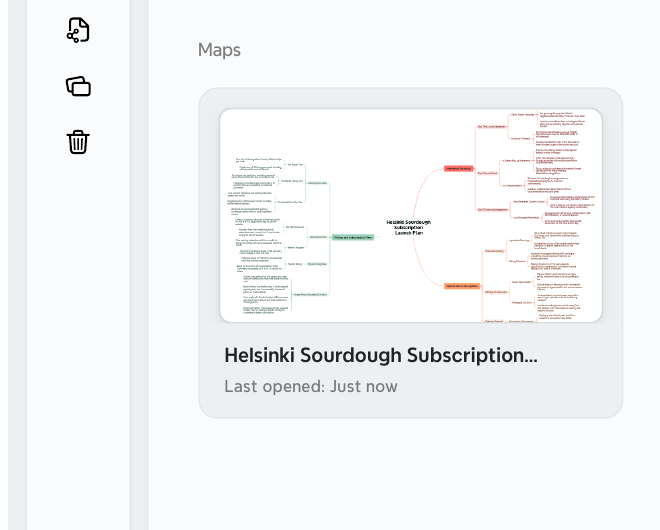
The map was genuinely useful. Its central topic was Helsinki Sourdough Subscription Launch Plan, with three main branches: Marketing Strategy, Operations and Logistics, and Pricing and Subscription Tiers. Marketing covered Day 1 pre-launch awareness, Day 2 launch event and Day 3 community engagement, with real detail such as a digital teaser campaign, influencer outreach, an in-bakery pop-up and a user generated content contest. Pricing invented sensible figures, Soloist 28 euros a month and Nordic Family 52 euros a month, plus an early bird 20 percent off and a 5 euro referral. The file also contains a second blank sheet, Map 2, with Central Topic and Main Topic placeholders, but all real content is on Map 1.

My second task was Xmind Agent expansion. I asked: Expand the Pricing and Subscription Tiers branch: add a third tier, and weigh the Soloist vs Nordic Family options for a single-person household in Helsinki. It finished in under 1 minute, and the Agent reported Thought for 1 seconds. It added The Helsinki Solo Plus Tier, 1 loaf a week plus 1 rotating seasonal pastry a month at 36 euros a month including central Helsinki delivery, and a Single-Person Household Decision branch. Its recommendation was clear: Soloist is the best default for one person eating 1 loaf weekly, Nordic Family is worthwhile only at 2 loaves weekly or sharing with guests, and Nordic Family costs 24 euros a month more. That is a real judgment, not just more nodes, and it appeared in the map as well as in the Agent reply. The cost, though, was 11.7 credits, taking my balance from 49.7 to 38.
My third task was Pitch mode plus PNG export. Pitch opened from the top toolbar and cost 0 credits. It produced exactly 4 slides, within the free limit of 5: a title slide, then Marketing Strategy, Operations and Logistics, and Pricing and Subscription Tiers. Each slide shows only the branch title, no sub-topic detail, so Pitch is a skeleton, not a presentation. Clicking the slide advances, the control bar buttons did not advance it for me, and clicking past the last slide does nothing. Every slide carries the footer Presented with xmind. One capture showed the last title as Pricing and SubscriptionTiers with the space missing, and a later capture showed it spaced correctly.
PNG export worked on the free plan and cost 0 credits. I exported with the defaults, Content Current Map, Map 1, Scale 100 percent, Layout 1, Aspect Ratio Auto, Transparent Background off, Split By Main Branch off. The app showed Exported, Time to share your minds, and a 585 KB PNG downloaded. I inspected that downloaded PNG myself after the test. It shows the full map cleanly, and at the bottom centre it carries a light grey footer that reads Presented with xmind, so the free export does carry branding even though the Show Xmind Branding toggle in the export dialog was off by default and is marked PRO.
Free Plan vs. Real Pricing (And Hidden Limits)
The free plan is generous for a first map and tight after that. It costs $0, gives 50 free AI credits at sign-up, allows up to 10 online maps, basic themes and stickers, 3 day version history, publishing maps by link, up to 5 slides in Pitch, and PNG export. That 50 credit figure resolves a discrepancy I found before testing: some older guides listed 10 credits, but the live pricing page and the in-app starting balance both say 50, and no 10 appears anywhere I saw.
Paid plans, checked live on the official pricing page on 12 November 2026, are per user. Pro is $10 a month on monthly billing or $4.92 a month billed annually, $59 a year, with 50 free AI credits at sign-up, up to 50 online maps, and export in PNG, SVG, PDF, Markdown and Office with no watermark. Premium is $15 a month or $8.25 a month billed annually, $99 a year, with 500 AI credits a month, unlimited collaborative maps, real-time collaboration, Gantt editing, and 30 day version history. A Black Friday promotion was shown during the test: Buy 1 year and get 6 months free, code BF2026, Nov 11 to Dec 2. I did not enter a card to check it out.
| Plan | Monthly billing | Annual billing | AI credits |
|---|---|---|---|
| Free | $0 | $0 | 50 once at sign-up |
| Pro | $10/month | $4.92/month, $59/year | 50 once at sign-up |
| Premium | $15/month | $8.25/month, $99/year | 500/month |

Two pricing notes matter. First, the pricing FAQ says monthly subscriptions and AI credit add-ons do not support refunds, and subscriptions auto-renew monthly or yearly, with access continuing to the end of the paid period after you cancel. Second, while you have valid AI credits, AI created maps are not restricted by the online map limit, up to 3 sheets per AI map, and when credits run out or expire the standard limit applies again.
Pros
- Cheap first map: AI text to map cost 0.3 credits and produced a full, detailed launch plan in under 1 minute.
- Agent gives real judgment: The expansion added a third tier and a clear Soloist first recommendation, with the reasoning shown in the map.
- Pitch and PNG work free: Pitch made 4 slides and PNG export worked, both at 0 credits.
- Generous free allowance for one map: 50 credits at sign-up left me with 38 after all three tasks.
- Clear pricing: Free, Pro and Premium are stated plainly on the official page, with monthly and annual figures side by side.
Cons
- Agent costs are uneven: The same kind of work cost 0.3 credits one time and 11.7 the next, with no price shown before I asked.
- Pitch slides are title only: Each slide shows just the branch title, no sub-topic detail, so it is not a finished presentation.
- Free exports carry branding: The downloaded PNG has a Presented with xmind footer, and removing the watermark needs Pro.
- Most exports are paid: SVG, Markdown, Word, Excel, PowerPoint, OPML and Calendar export are all badged PRO.
- Delayed email verification codes: Email sign-up verification codes never reached my inbox or spam folder during testing, so I had to use direct sign-in instead.
What Real Users Are Saying
Xmind has the strongest review volume of any tool in this batch. On G2 it scores 4.5 out of 5 from 474 reviews, and on Capterra it scores 4.5 out of 5 from 120 reviews. On Product Hunt, Xmind 2027 has 12 reviews at 4.75 out of 5. The App Store rates it about 4.8 out of 5 from about 7,000 ratings. Most of those G2 and Capterra reviews predate the 2027 and Agent release, so they validate the product, not the new AI agent specifically.
What users praise is the core mapping experience: an easy way to get past a blank canvas, clear visual structure, and AI features that help with planning, especially the AI work breakdown. What they complain about is the free tier and the price. G2 reviewers say many useful features are locked behind the paid version, export options and customisation are restricted on free, large maps can feel slow, and the shift away from a one-time purchase to annual subscriptions frustrates students and users in developing economies. Several reviewers dislike the credit system itself, and one said there are far too many AI integrations and pop-ups telling users to use AI. My test matches that pattern: the mapping is strong, the Agent is useful, and the costs and locks are where the friction lives.
Sources: G2 reviews for Xmind, Xmind on Product Hunt, and Xmind pricing.
Who Should Use Xmind 2027 (And Who Should Skip It)
Xmind 2027 is worth trying if you think in diagrams and you want AI to turn a brief into a structured map you can then edit. That covers product managers planning a launch, students organising research, and consultants mapping a client problem. The free 50 credits are enough to test it properly, and the PNG export means you can share the result without paying.
Gamma Review
If you need automated slide presentations generated from a prompt or outline, see our hands-on Gamma review.
Frequently Asked Questions
Is Xmind really free?
Yes, the free plan costs $0 and needs no credit card. It gives 50 AI credits once at sign-up, up to 10 online maps, and PNG export with a Presented with xmind footer.
Does Xmind add a watermark on the free plan?
Yes, in two places I verified. Pitch slides carry a Presented with xmind footer, and the downloaded PNG export also carries that footer at the bottom centre. Removing the watermark needs Pro.
How much does Xmind cost per month?
Pro is $10 a month or $4.92 a month billed annually. Premium is $15 a month or $8.25 a month billed annually. Free is $0.
Can you use Xmind creations commercially?
Xmind does not block commercial use of the maps you create on the free plan in its pricing page, but free exports carry the Presented with xmind footer, and several export formats are paid features. Check the current terms on xmind.com before using a map in a client deliverable.