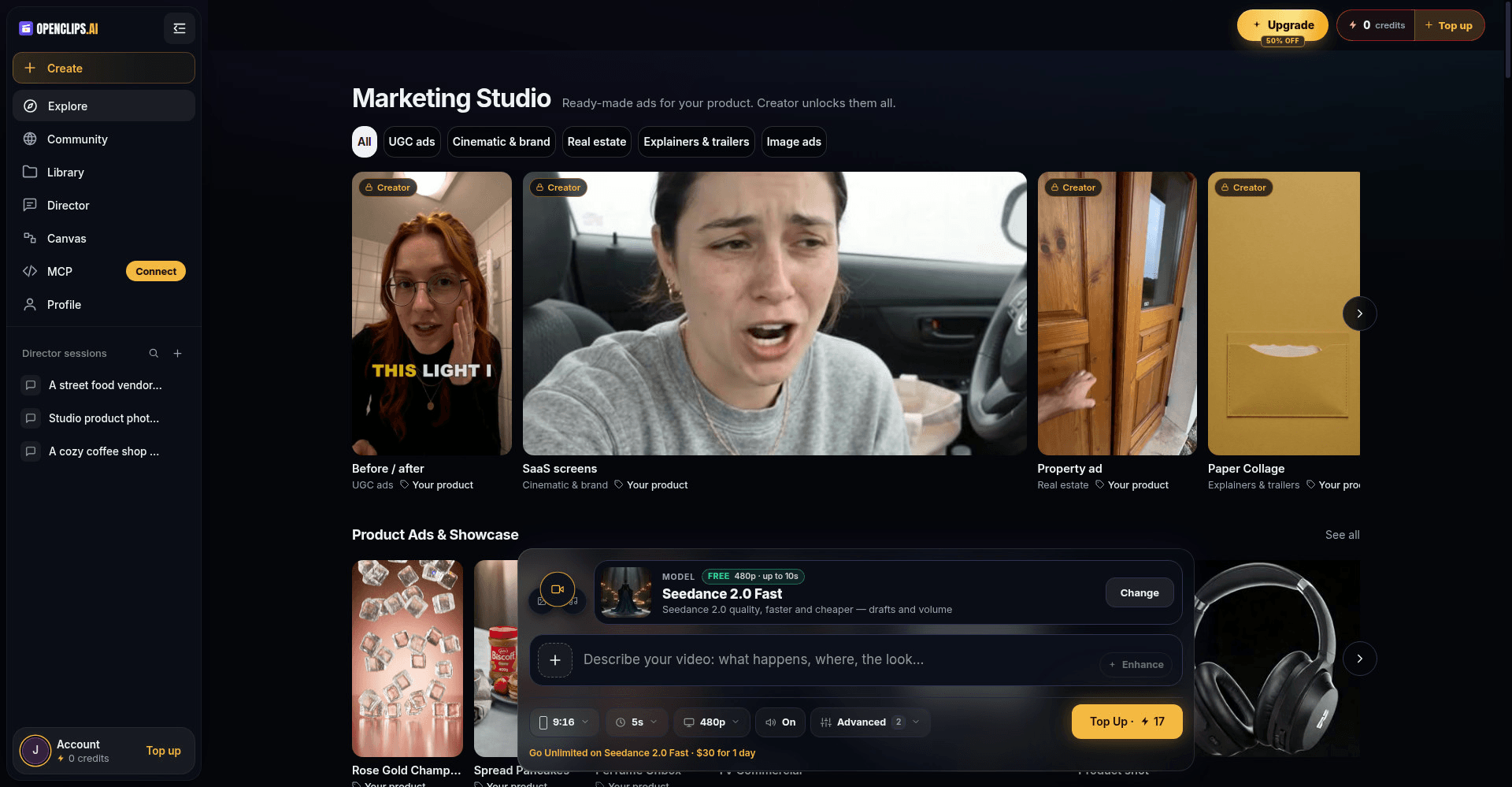
I signed up for OpenClips with a free account (no credit card required) and received 30 free credits. In about ten minutes I made two videos and one image, spent all 30 credits, and hit the free plan wall on almost everything else the site advertises. The generations themselves worked well. The free tier is the story: it is a short demo, not a studio.
OpenClips was added to Toolify on 3 November 2026, and it already has 33 reviews on G2 at a perfect 5.0 out of 5. That number needs a careful read, because several of those reviews call the product Coinis, its parent brand, and some are marked seller invite and incentivized. My test is the counterweight: what the free plan actually gives you, with exact credit counts.
What Is OpenClips?
OpenClips is a browser workspace that puts more than 100 image and video models behind one credit balance. The models named on the site include Seedance 2.5, Kling 4.0, Veo 3.1, MiniMax H3, Runway Gen-4.5, Seedream, and Flux. You type a prompt, pick a model, and generate. There is also a Director Agent, a Marketing Studio with ready-made ad templates, a Canvas, and an MCP integration so Claude can drive generations from the terminal. The pitch is one account instead of five model sites and five subscriptions, aimed squarely at ad makers and small brands.
That pitch is honest about the catalog and misleading about access. The pricing page lists 100 plus models for every plan, including Free. In the composer during my test, only 3 of the 68 video models were unlocked on the free plan. The other 65 unlock with your first purchase. Keep that gap in mind when you read the plan table below.

Hands-On Test: How OpenClips Actually Performed
In line with our editorial testing policy, I signed up on 13 November 2026. OpenClips blocks disposable email addresses, so you need a standard email or Google account. I registered by email with a verification code, and no credit card, phone number, or ID check was requested. My starting balance was 30 credits, not the 50 credits that Toolify and several directories advertise.
Test 1 was text to video. My prompt, verbatim, was “A cozy coffee shop at golden hour, a barista pouring latte art, warm light through large windows, cinematic, photorealistic.” Settings were Seedance 2.0 Fast, 480p, 9:16, 5 seconds, audio on. It cost 17 credits. I started it at 08:56 EET and it was ready by about 08:59 EET, in about 3 minutes. The output followed the prompt well: a young barista pouring milk into a coffee cup in a warm cafe, with the OPENCLIPS.AI watermark at top center. Download worked on the free plan, with a toast naming the .mp4 file.
Test 2 was an image. My prompt, verbatim, was “Studio product photo of a matte ceramic coffee mug on a beige background, soft shadows, minimal, photorealistic.” Settings were Seedream 5.0 Flash, 1K, 1:1. It cost 4 credits. I started it at 09:00 EET and it was ready by 09:01 EET, in about 1 minute. The image was clean and on brief, but it carried a prominent repeating diagonal OPENCLIPS.AI watermark across the whole image. Download worked, with a .jpg toast.
Test 3 was a second video, and the credit maths forced a compromise. A 5 second clip on Seedance 2.0 Mini would have cost 11 credits, two more than the 9 I had left, so I made a 4 second clip for 9 credits. My prompt, verbatim, was “A street food vendor tossing noodles in a flaming wok at a Bangkok night market, neon signs glowing, steam rising, cinematic.” Settings were Seedance 2.0 Mini, 480p, 1:1, 4 seconds. I started it at 09:02 EET and it was ready by 09:04 EET, in about 2 minutes. The output was strong: a vendor at a wok in a neon night market, watermarked top center. I clicked Download twice with no error and no paywall, but no download toast was captured, so I am reporting that as button works, no block, not as a confirmed download.
My ending balance was exactly 0 credits: 30 minus 17 minus 4 minus 9. No generation failed, so no refund case arose. Three generations, about 6 minutes of rendering, and the free plan was done.

Free Plan vs. Real Pricing (And Hidden Limits)
The free plan costs $0 and needs no card. It gives 30 credits once, and the pricing page confirms that figure in its comparison table: Free, 30 credits once. There is no monthly free grant and no daily refresh, so when the 30 are gone, you pay or you stop. Only three video models are free, free video is capped at 480p and 10 seconds, Director Mode is locked, and every Marketing Studio ad template is locked behind Creator. The composer also showed an upsell: Go Unlimited on Seedance 2.0 Fast, $30 for 1 day.
Paid plans, checked on the official pricing page on 13 November 2026, using the monthly billing figures:
| Plan | Monthly billing | Annual billing | Monthly credits |
|---|---|---|---|
| Free | $0 | $0 | 30 once |
| Starter | $9 a month | $5 a month, $63 a year | 900 |
| Creator | $29 a month | $20 a month, $240 a year | 3,200 |
| Pro | $79 a month | $47 a month, $564 a year | 9,000 |
| MAX | $199 a month | $99 a month, $1,188 a year | 24,000 |
Black Friday is live on the pricing page: 40 percent off Starter, 31 percent off Creator, 40 percent off Pro, and 50 percent off MAX on yearly plans, ending 30 November 2026 at 4:00 PM Pacific. It is applied automatically, there is no code to enter, and it does not apply to pay as you go packs. Yearly buyers also get bonus credits: 500 on Starter, 1,800 on Creator, 5,000 on Pro, and 14,500 on MAX. Top-up discounts run from 10 percent on Starter to 30 percent on MAX. Pay as you go packs are $10 for 800 credits, $25 for 2,000, $50 for 4,000, $100 for 8,000, and $200 for 16,000, with no subscription.
Per-run costs on the official pricing page are Seedance 2.0 Fast at 17 credits per 5 second 480p video, Seedance 2.5 at 63 credits per 5 second 480p video, MiniMax H3 Max Turbo at 16 credits per 5 second 480p video, and Seedream 5.0 Flash at 4 credits per image. My test matched those rates exactly: 17 for the Fast video, 4 for the image, and 9 for the 4 second Mini clip. I checked the official pricing page, in-app upgrade banner, and Product Hunt launch post, and there were no active promo codes, launch discounts, or student deals.
Terms flag: paid plans auto-renew for successive equal periods unless cancelled, with a 30-day reminder before an annual renewal and a 7-day reminder before a monthly one, and no refunds after a new period starts. Subscription credits do not roll over. Top-up credits do not expire while the account stays open. There is also a commercial-use tension worth knowing. The pricing FAQ says commercial use is on every paid plan, while Terms section 8.4 gives the free-plan licence for any lawful purpose including commercial use, but Terms sections 9.5 and 9.6 forbid removing or concealing watermarks or C2PA provenance metadata, and forbid selling or redistributing raw output as standalone content. In practice, free outputs are watermarked and you cannot strip the watermark.

Pros
- Three generations worked, fast: two videos and one image in about 6 minutes of rendering, with prompt match good on all three and downloads working on the free plan.
- Exact cost shown before a run: the composer showed the credit cost up front, and every charge matched the official rate card exactly.
- Real model choice on free: Seedance 2.0 Fast, Seedance 2.0 Mini, and Seedream 5.0 Flash are genuinely usable without paying.
- Transparent per-second pricing: the pricing page lists a rate card per model and resolution, so you can price a clip before you commit.
Cons
- Only 30 free credits, not 50: directory listings advertise 50, the app gave 30, and that is one video, one image, and one short clip before you hit zero.
- Only 3 of 68 video models are free: Seedance 2.5, Kling 4.0, Veo 3.1, MiniMax H3, and Runway Gen-4.5 all need a first purchase, despite the 100 plus models claim on every plan.
- Heavy watermark on every free output: a logo on both videos and a repeating diagonal watermark across the whole image, with removal paid only.
- Director and Marketing Studio locked: the two features that make OpenClips more than a model picker need Creator or higher.
What Real Users Are Saying
OpenClips has real user reviews, and they are unusually positive: 33 reviews on G2, all 5 out of 5, for a 5.0 average as of 13 November 2026. Read that number with the caveats. Several reviewers call the product Coinis, its parent brand, so the record mixes two names. Some reviews are marked seller invite and incentivized. And the G2 pricing page says OpenClips has no permanent free plan, only a free trial, which contradicts my hands-on test of 30 free credits with no card.
What users praise, consistently, is the MCP integration with Claude, with one reviewer running separate Claude projects per brand, the range of models in one place, brand assets pulled from a website link, and ad videos that stick to the real product instead of inventing claims. One reviewer says they switched from Higgsfield to OpenClips because it is much better and cheaper. The complaints are narrower: faces and complex movement can take a few attempts, and the best models can be very slow to render. I found no Trustpilot profile and no Reddit review thread for OpenClips in my searches, so G2 is the whole independent record so far.
Who Should Use OpenClips (And Who Should Skip It)
Use OpenClips if you want to test Seedance video generation from one account with no card, you are happy with 480p watermarked clips for a first look, and you make ads, because the MCP and brand-asset features are the parts paying users actually praise. Skip it if you need clean, client-ready video without paying, because every free output is watermarked and removal is paid. Skip it too if you came for Kling, Veo, or Runway, because none of them is free here. And if 30 credits sounds thin, it is: budget for a Starter month or a $10 top-up pack before you plan a real project around it.
Qixel AI Review
If your workflow requires video resolution upscaling and visual quality enhancement, explore our Qixel AI review.
Frequently Asked Questions
Is OpenClips really free?
Yes, the free plan costs $0 with no card, but it is 30 credits once, not a monthly grant. In my test that covered two short videos and one image, and then the balance was 0. Directory listings that say 50 free credits do not match what the app gave me.
Does OpenClips add a watermark on the free plan?
Yes. Both free videos carried an OPENCLIPS.AI logo watermark at top center, and the free image carried a prominent repeating diagonal OPENCLIPS.AI watermark across the whole image. A Remove watermark button exists on video previews and is a paid feature.
How much does OpenClips cost per month?
Paid plans start at Starter $9 a month billed monthly, or $5 a month billed annually at $63 a year. Creator is $29 a month or $20 a month annually, Pro is $79 a month or $47 a month annually, and MAX is $199 a month or $99 a month annually. Black Friday discounts of 31 to 50 percent off yearly plans run to 30 November 2026.
Which video models are free on OpenClips?
Only three: Seedance 2.0 Fast, Seedance 2.0 Mini, and Gemini Omni Flash 1.1. The other 65 video models in the composer, including Seedance 2.5, Kling 4.0, Veo 3.1, MiniMax H3, and Runway Gen-4.5, unlock with your first purchase.
Can you use OpenClips creations commercially?
The Terms give the free-plan licence for any lawful purpose including commercial use, but they forbid removing watermarks or C2PA metadata and forbid selling raw output as standalone content. The pricing FAQ says commercial use is on every paid plan. In practice, free outputs are watermarked, so use them commercially only with the watermark intact.