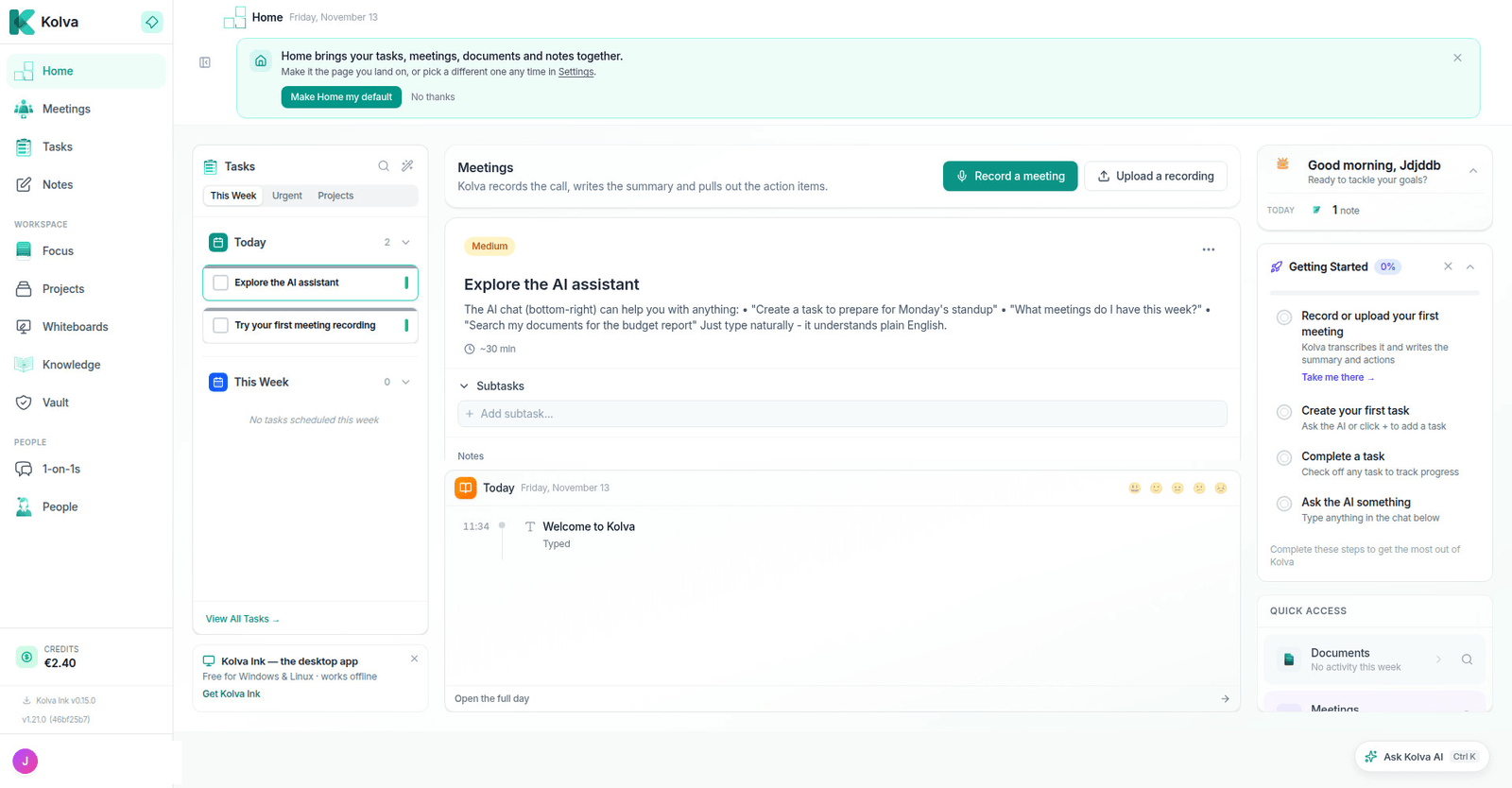
Kolva promises to be the one place where your meetings, tasks, notes, and documents live together, with an AI assistant that transcribes your calls, writes the summary, pulls out the action items, and answers questions about everything you have stored. The price is the hook: pay as you go from 20p an hour of transcription, with 2 euros of free credit a month for the first two months and no card required. I signed up with Google in seconds and set out to test it on a fictional bakery. My quick takeaway: the workspace is clean, the free credit is real, and the non-AI parts work, but the AI assistant, the feature the whole product is built around, was down for the entire test day, and I could not verify a single transcription. This review reports exactly what worked, what failed, and what I could not test.
The headline finding is not a small bug. Every time I asked the AI assistant a question, in Standard mode and in Pro mode, it came back with the same error: Kolva’s own prepayment credits with Google were depleted. I tried four times across two hours, then checked again two hours later, and the answer was the same. The AI features were not slow or flaky. They were off. Everything else I could touch worked fine, which makes the outage harder to explain away: the notes, tasks, meetings, and billing pages all behaved normally while the AI layer sat dead.
What Is Kolva?
Kolva is a browser-based AI workspace for solo professionals and small teams. One account holds your meetings, tasks, notes, documents, and an AI assistant that is supposed to tie them together. You record Zoom, Teams, or Meet calls from Chrome with no bot joining the call and no extension to install, and Kolva writes a transcript, identifies speakers, summarises the discussion, and extracts tasks you can turn into to-dos. It also offers document search across your whole workspace, task breakdowns, auto-organisation, and MCP support so tools like Claude can work with your tasks and meeting context.
It launched on Product Hunt on 27 January 2026 with 4 upvotes, and it is still a small product: I found no reviews on Product Hunt, no G2 profile, and no Trustpilot profile. The most complete independent write-up I found is on AtomicGains, which calls it a connected workspace for founders, consultants, product managers, and small teams, and warns that it does a lot, so new users need time to learn where things belong. There is also a desktop app, Kolva Ink, free for Windows and Linux, that works offline.
Hands-On Test: How Kolva Actually Performed
In line with our editorial testing policy, I signed in with Google and landed on the Home dashboard in under a minute. No card, no phone check, no password. The sidebar showed “Credits 2.40 euros”, and the billing page showed a current balance of 2.00 euros in Beta Credits, with 2 months remaining and 0 spent. Those two numbers already disagree by 0.40 euros, and the billing page also says “You get 5 euros in starter credits when you sign up”, which does not match the 2.00 euros actually granted. I note all three figures because a tool that sells itself on transparent usage pricing should agree with itself about the free credit.
Test one was meeting transcription, the core promise. The upload option exists and accepts MP3, M4A, MP4, WAV, WebM, and OGG up to 500 MB, charged for the audio’s real length. I did not test the MP3 upload or live microphone recording in this session (my browser environment blocked screen and microphone capture, returning “Permission denied. Please allow screen/microphone access”). Each failed attempt still created an empty meeting shell, so my Meetings list now holds two entries with no recording and zero words. Nothing was charged. I am clear about this: transcription accuracy is unverified in this review, not failed. The environment blocked the test, not Kolva.

Test two was the AI assistant, and this one Kolva owns. I wrote a 103-word fictional price list note for the bakery, with a pumpkin spice loaf at 5.25 pounds, a Christmas cake at 28.00 pounds with pre-orders capped at 80 cakes, and flour from Greenfield Mills at 1.20 pounds per kilo. Then I asked the assistant what the loaf costs, what the cake pre-order cap is, and who supplies the flour. Four attempts, Standard twice and Pro twice, all failed with the identical error: Kolva’s own Google prepayment credits were depleted. The error text also showed the assistant runs on Google’s Gemini 3.1 flash-lite model. The failed chats were not saved, so my AI chat history stayed empty. Two hours later I asked the assistant one more simple question, “What notes do I have?”, and got the same error again. That is five failures across four hours, in both modes, for a feature that is the product’s main selling point.

What did work? The manual workspace. The note saved instantly, the task list and navigation behaved normally, and the AI panel correctly detected which note I had open. The “Subtasks” control on the sample task only collapsed a section; no AI subtask generation ran, and I did not test workspace-wide search, because both would route through the same dead backend. My credit balance did not move all day: 2.40 euros in the sidebar, 2.00 euros in billing, 0 spent, because nothing I did produced a billable AI result.
Free Plan vs. Real Pricing (And Hidden Limits)
Kolva has no subscription forcing you in. The pay-as-you-go plan costs 0 pounds a month: you top up credit and pay only for what you use, starting from 20p an hour of meeting transcription. The first two months include 2 euros of free credit each month, no card required, and the top-up minimum is 2 euros. Unlimited costs 14 pounds a month with unlimited transcription at a fair-use cap of 40 hours a month, and Unlimited Pro costs 28 pounds a month with a 100-hour fair-use cap, premium AI chat models, and a priority queue. After the fair-use cap, recordings continue on the standard model, so you are never cut off.
The per-use prices are genuinely cheap, and Kolva publishes them with worked examples: one hour of meeting transcription about 0.24 euros, a document processed about 0.00 euros per 1,000 tokens, a task broken into subtasks about 0.01 euros, a search across your workspace about 0.02 euros, auto-organising ten documents about 0.05 euros, and a task extracted from a meeting about 0.01 euros. Storage is 0.60 euros per GB a month beyond the first 100 MB free. The pricing page says 6 euros buys about 16 hours of meetings, about 1,250 documents, about 500 subtask breakdowns, or about 330 searches. It also prices the same usage basket at 2.47 euros a month on Kolva against 8.40 euros on Otter. The table below is what I verified on 13 November 2026.
| Plan | Price | Transcription | Fair use | AI chat |
|---|---|---|---|---|
| Pay as you go | £0 / month | from 20p / hour | Pay per use | Standard models |
| Unlimited | £14 / month | Unlimited | 40h / month | Standard models |
| Unlimited Pro | £28 / month | Unlimited | 100h / month | Premium models |
Two mismatches are worth flagging. The in-app Billing page lists meeting transcription at 0.29 euros an hour, against about 0.24 euros on the pricing page and in the New recording dialog, which offers Standard at about 0.24 and Premium at about 0.42. Storage is 0.59 euros per GB a month in the app against 0.60 on the page. And the billing page’s “5 euros in starter credits” does not match the 2.00 euros granted. None of these is large money, but a pay-per-use tool lives or dies on whether its numbers add up, and on the test day Kolva’s did not. On promos, the pricing page offers the two months of free credit and the invite dialog offers 2 euros each way for referrals. The Product Hunt page shows an “Extra $2 in credit” deal button, but the code sits behind a Product Hunt sign-in wall, so I could not verify it and I am not claiming a promo here.

On the terms side, credits are generally non-refundable, prices can change with 30 days’ notice, and inactive accounts may be deleted after 12 months, with usage credits forfeited, after a 30-day warning. Content you upload is scanned to detect illegal material, with hashes retained for 7 or more years. The AI features use OpenAI, Anthropic, and Google, who are contractually bound not to train on your data, but support conversations are logged and may be used to train their customer-support systems. The pricing page also says your data stays in the EU and “we never train on your content”.
Pros
- Real free credit, no card: 2 euros a month for two months, and my balance was never touched by a card or a trial clock
- Cheap pay-as-you-go pricing: about 0.24 euros an hour of transcription, with every per-use price published and worked examples on the page
- No forced subscription: the 0 pound plan is the default, and fair-use caps degrade to the standard model instead of cutting you off
- Clean connected workspace: meetings, tasks, notes, and documents in one place, with no bot to invite and no extension to install
- Honest manual tools: notes, tasks, and navigation all worked normally throughout the test
Cons
- The AI assistant was down all day: five requests in two modes failed with the same error, Kolva’s own Google credits depleted, confirmed again two hours later
- Transcription accuracy is unverified: I could not complete a single recording or upload in my test environment, so I cannot vouch for the core feature
- Kolva’s own numbers disagree: 2.40 euros in the sidebar against 2.00 in billing, a 5 euro starter claim that matches neither, and 0.24 against 0.29 euros an hour for transcription
- Almost no independent user evidence: zero Product Hunt reviews, no G2 or Trustpilot footprint, and one full independent review
- Learning curve: the one independent review warns that Kolva does so much that new users need time to learn where things belong
What Real Users Are Saying
There is very little independent user evidence for Kolva, and I will not pad it. Product Hunt shows “No reviews yet” on the reviews page. I found no G2 profile and no Trustpilot profile. Do not confuse it with Clova Note, the Naver and LINE notetaker with 4.7 stars from 155,000 ratings, which is a different product entirely.
The fullest independent review is on AtomicGains, which calls Kolva a connected workspace for people whose work is spread across too many places, and praises the meeting intelligence: headline, sentiment, decisions, task extraction, and recurring series detection. Its main warning matches what I saw in the dashboard: Kolva does a lot, so new users need time to learn where things belong, and output quality depends on good organisation and naming. A small directory listing on HyperStore (HyperGPT) rates Kolva 4.9 out of 5 from 8 reviews, published 10 April 2026, and praises the pay-as-you-go pricing and the browser recording with no installation, while noting that pricing transparency depends on actual meeting duration and that the browser approach limits offline capture. Treat that as a small listing, not a major review platform. A SourceForge comparison page confirms the positioning: browser-based, no subscriptions, pay only for the AI you use, transcripts with speaker identification, and summaries and action items you can turn into tasks.
Nothing in that evidence contradicts my test, and nothing in it covers the outage I found. No other reviewer has reported the AI assistant being down, which is either because it is a new problem or because almost nobody has tested it hands-on and written it up. Either way, the gap between the marketing and the test day is the story of this review.
Who Should Use Kolva (And Who Should Skip It)
Kolva is worth a look if you are a solo operator or a small team that wants meetings, tasks, notes, and AI search in one bill, and you like the idea of paying per hour instead of a monthly subscription. The 2 euros of free credit is enough to test the workspace for real, and the per-use prices are cheap enough that a light user may never need a plan. It is also a sensible pick if you dislike bots joining your calls, since Kolva records from the browser instead.
Better Analyst Review
If you want interactive conversational data analysis and chart generation for business spreadsheets, see our Better Analyst review.
Skip it for now if you need meeting transcription and AI summaries to work today, because on my test day the AI layer was down and I could not verify a single transcript. Wait until Kolva restores its AI billing and someone re-tests it, or test the free credit yourself and check the assistant answers before you top up. Skip it too if you only need transcription: a dedicated notetaker such as Otter, Fireflies, or Fathom will do that one job with more maturity, even though Kolva is cheaper per hour. And if you want a Notion-style workspace without the meeting layer, Notion itself is the more proven choice.
Frequently Asked Questions
Is Kolva really free?
Pay as you go costs 0 pounds a month with no subscription, and the first two months include 2 euros of free credit each month, no card required. There is no permanent free tier: after the free credit, usage is paid from your balance, with a 2 euro top-up minimum.
How much does Kolva transcription cost?
About 0.24 euros per hour on the Standard model and about 0.42 euros per hour on Premium, from 20p per hour. Note that the in-app Billing page lists 0.29 euros per hour, which conflicts with the pricing page, so check the price in the app before you record.
Does Kolva train AI on my data?
The pricing page says your data stays in the EU and “we never train on your content”. The Terms add that the AI providers (OpenAI, Anthropic, Google) are contractually bound not to train on your data, but support conversations are logged and may be used to train their customer-support systems.
What happened when you tested Kolva?
I signed in with Google in under a minute and the workspace worked: notes, tasks, meetings, and billing all behaved normally. But the AI assistant failed five times with the same error, Kolva’s own Google credits depleted, and I could not complete a transcription in my test environment, so transcription accuracy is unverified in this review.