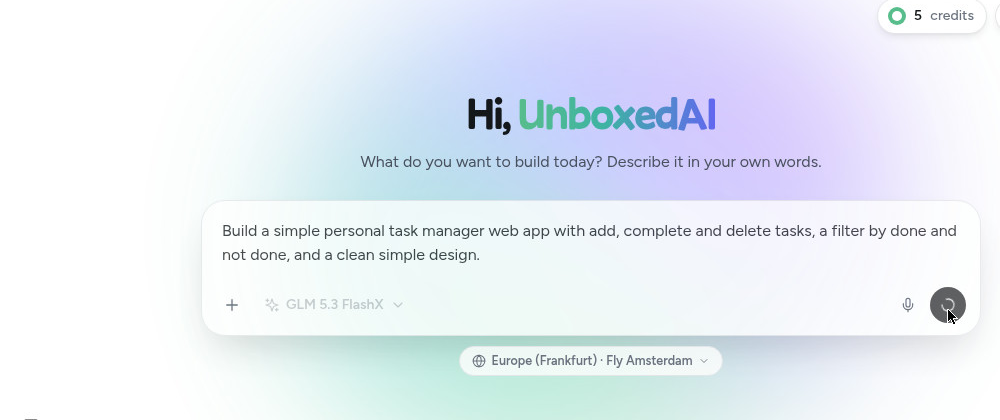
I tested Coderblock AI on 12 November 2026, and the free plan did something I did not expect: it built a working web app and published it live, and the whole build cost me 0 credits. My task manager, FlatTask, went from one prompt to a live preview in about 4 minutes, and a second prompt added a due-date field in 42 seconds. The catch is what happens when you want the code out. Downloading the source and syncing to GitHub both need Pro, and the free allowance has shrunk since launch, from 20 credits in September to 5 credits now, so the free plan is a real test drive, not a way to build a product for free.
If you have one app idea and you want to see it running on a real web address before you spend anything, this is worth trying on the free plan. If you need to own the code, work in a private repo, or keep building past the first app, you will be paying, and the plan that unlocks download is Pro at 20 euros a month billed yearly.
What Is Coderblock AI?
Coderblock AI is a full-stack web app builder from Coderblock, founded by Danilo Costa. You describe the app you want in plain English, and a team of specialised AI agents designs, codes, tests and deploys it: a React frontend, a real backend with database, auth and storage, plus an AI Gateway so the app itself can use chat, image generation and AI agents. It offers 32 templates and publishes to a live address on coderblock.app. It opened to everyone on 30 September 2026, after about 500 early access users had built real products with it, and it launched on Product Hunt on 7 to 8 October 2026.
That full-stack promise is what sets Coderblock apart from the web builders that stop at a static demo. Lovable, Bolt.new and v0 build the frontend fast, but Coderblock also gives you the database, the login and the file storage, and it lets the agent pick the model for each step. In my test the planning steps ran on claude-haiku-4-5 and the build ran on GLM 5.3 FlashX. It also asks setup questions and shows you a plan to approve before it builds, which is a useful check on what you are about to spend credits on.
Hands-On Test: How Coderblock AI Actually Performed
In line with our editorial testing policy, I signed up by email on 12 November 2026 after passing a quick Cloudflare verification check. Email confirmation was instant, and no credit card or payment details were required at any point. My starting balance was 5 free credits granted as a welcome bonus, which matches the official pricing page.

My first prompt was a task manager: “Build a simple personal task manager web app with add, complete and delete tasks, a filter by done and not done, and a clean simple design.” The agent asked 4 setup questions, which I skipped, then showed a 3-phase plan, Core Task Manager, Polish and UX, and Advanced Features optional, and I approved it. The app, called FlatTask, was built in 1 minute 37 seconds, 11 files, with a working preview by about 13:57 UTC, about 4 minutes from send. I verified every feature live: adding a task (“Buy milk”), completing it with a strikethrough and blue check, deleting it with an Undo toast, filter tabs All, Active and Completed with live counts, tasks persisting in browser storage, and a Clear completed button. The design was clean and flat as requested, near-black on white with a single blue accent. That whole build cost 0 credits, and my balance stayed at 5.
Then came the defect, and the honest part of this review. The generated app shipped with a React console warning, setState during render from the sonner toast library, with the Toaster mounted inside the page. Coderblock auto-detected it and auto-fixed it in 1 minute 20 seconds, upgrading sonner and moving the Toaster to the app root. That fix then introduced a fatal error of its own, “useRoutes() may be used only in the context of a Router component”, and the preview showed “The app encountered an error” at 14:01 UTC. The auto-fix cost 0.6 credits, and the error was resolved during my second prompt, when the preview rendered again. So the platform catches its own mistakes, but its fix can break the app, and you pay for the fix in credits.
My second prompt was a follow-up edit: “Add a due-date field to tasks.” It worked in 42 seconds, cost 0.3 credits, and changed 4 files. I verified it live in the standalone preview: a Due date picker under the task field, and adding “Pay bills” with a due date of 13 November 2026 showed a “Tomorrow” badge next to the task, with overdue highlighting, while an invalid date was rejected by native validation. My ending balance was 4.1 credits, so the whole session burned 0.9 credits.

Publishing is where the free plan surprised me most. Publish is available on the free plan, and my app went live at cb-4e2cdc6a.coderblock.app in about 3 minutes, after a 90 second build and a server cold-start message. Published apps carry a small “Built with Coderblock” badge at the bottom right. A custom subdomain and custom domain connect are offered, with a search visibility toggle and SEO and Open Graph settings, though I did not test a custom domain beyond the dialog.
Free Plan vs. Real Pricing (And Hidden Limits)
The free plan is the Community plan: 0 euros forever, with 5 AI credits, one time, 2 AI-assisted projects, 10MB upload, 1GB database with 20 hours of activity a month, 50 transactional emails a day, public repositories only, and community support. No credit card is required. The 10 extra credits advertised in the welcome dialog need a 14-day Pro trial, with no card required, and are not added automatically.
Paid plans, checked live on the official pricing page on 12 November 2026, are priced in euros, not dollars. Pro is 20 euros a month billed yearly, 240 euros, or 25 euros a month on monthly billing, with 100 monthly AI credits, 50 percent less credits per message, twice as many messages, unlimited projects, AI video and voice generation, and private repositories. Business is 40 euros a month billed yearly, 480 euros, or 50 euros a month monthly, with 200 monthly AI credits, 67 percent less credits per message, and three times as many messages. Enterprise is custom, with SSO, SLA and on-premise deployment. Prices include VAT, and EU customers are billed by Coderblock S.r.l. in Italy. One confusion to flag: the account Subscription panel shows the plan as “Community, $0/monthly” with a Buy Credits option priced in USD, so the billing currency differs between the marketing page and the account.
| Plan | Price | Allowance | Key limits |
|---|---|---|---|
| Community | 0 euros forever | 5 credits, one time | 2 projects, public repos only, no code download, no GitHub sync |
| Pro | 20 euros a month, billed yearly | 100 credits a month | Code download and GitHub sync included, private repos |
| Business | 40 euros a month, billed yearly | 200 credits a month | Everything in Pro, priority support, advanced security |
Two discrepancies are worth knowing before you sign up. First, the free allowance has shrunk since launch. The Product Hunt launch post offered 30 free credits, the 30 September 2026 launch coverage recorded 20 lifetime credits at launch, with 10 more for anyone who activates the Pro trial, and the official pricing page now shows 5 lifetime credits, which is what I measured in my account. A beginner guide I checked still says 30, which is now out of date. Second, the pricing-page FAQ says code can be downloaded “at any time, with no strings attached”, but in the editor on the free plan, Download is PRO and Business only, GitHub sync is PRO and Business only, and Share is PRO only. The terms, last updated 19 October 2026, say user code and prompts are not used to train AI models and the user owns their code, which is good, but they also reserve Coderblock’s right to use your projects as case studies, bar using outputs to compete with Coderblock, and give no refunds once Launch Offer development has commenced.

Pros
- First build cost 0 credits: my full task manager app, 11 files in 1 minute 37 seconds, used no credits at all, and the whole session burned only 0.9 credits.
- Real working app, published free: FlatTask ran live with add, complete, delete, filters and a due-date badge, and publishing to a coderblock.app address is included on the free plan.
- Fast follow-up edits: adding the due-date field took 42 seconds and cost 0.3 credits.
- It fixes its own mistakes: the platform auto-detected a console warning in the generated app and fixed it without being asked.
- Full-stack, not a demo: React frontend, real backend with database, auth and storage, plus an AI Gateway, with model choice per step.
Cons
- Code download is not free: downloading the source and syncing to GitHub both need Pro, despite the pricing FAQ saying download has no strings attached.
- Free credits have shrunk: 20 at launch, 30 in the Product Hunt post, 5 lifetime credits now, confirmed in my account.
- Its own fix broke the app: the auto-fix of a console warning introduced a fatal Router error and the preview showed an error page until the next prompt.
- Published apps carry a badge: free published apps show a “Built with Coderblock” attribution badge.
- Thin independent evidence: no G2, Trustpilot or Reddit footprint was found, and the only verified rating is Product Hunt 5.0 out of 5 from 4 ratings.
What Real Users Are Saying
Independent feedback on Coderblock is thin, because it opened to everyone on 30 September 2026, about six weeks before my test, so I am clear about how little there is. I found no G2 listing, no Trustpilot listing and no Reddit thread. Search results for “Coderblock” on G2 and Trustpilot were polluted by Code::Blocks, a different product, a C and C++ IDE with 97 G2 reviews, which I did not use.
What does exist is the Product Hunt rating, 5.0 out of 5 from 4 ratings, on a launch post by founder Danilo Costa that offered 30 free credits at launch. A beginner guide on aitoolsteps.com walks through signup to publishing and compares Coderblock with Lovable, Replit Agent and Bolt.new, but it is a how-to guide, not an independent user review, and its free-plan figure of 30 credits is now out of date. A launch report on pasqualepillitteri.it from 30 September 2026 confirms the public opening, 20 free credits at launch, and about 500 early access users, and ShipRadar rated it 3 out of 5 on 14 October 2026. That is the whole verified record so far: a perfect but tiny Product Hunt rating, a middling ShipRadar score, and no complaint record to report.
Who Should Use Coderblock AI (And Who Should Skip It)
Use Coderblock if you have one web app idea and you want to see it running on a real web address before you pay for anything. The free plan is genuinely useful for that one test: a working app, a live preview, a follow-up edit, and a published link you can share, all for less than 1 credit in my test. It is also a good fit if you want a real backend with database, auth and storage without setting one up yourself.
Huxly AI Review
If you are building mobile apps with React Native and Expo rather than browser web apps, see our hands-on Huxly AI review.
Skip it, or do not pay for it yet, if you need to own the code, work in a private repo, or build more than one small app. In that case the 20 euros a month Pro plan is the real starting price. If you build for mobile instead of the web, Huxly AI is the closer comparison from the same batch, and if you want the larger ecosystem, Lovable and Bolt.new are the safer bets while Coderblock builds its review record.
Frequently Asked Questions
Is Coderblock AI really free?
Yes, to start. Community is 0 euros forever with 5 AI credits, one time, and no credit card required. In my test the first full build cost 0 credits, and the whole session burned 0.9 credits, leaving 4.1.
Does Coderblock AI add a watermark on the free plan?
Published apps carry a small “Built with Coderblock” badge at the bottom right. The live preview itself showed no watermark.
How much does Coderblock AI cost per month?
Pro is 20 euros a month billed yearly (240 euros a year), or 25 euros a month on monthly billing. Business is 40 euros a month billed yearly (480 euros a year), or 50 euros a month monthly. The marketing page lists rates in euros while the checkout panel lists dollars.
Can you use Coderblock AI creations commercially?
The terms say the user owns their code, and published apps can be shared on a coderblock.app address. On the free plan, published apps carry the Built with Coderblock badge, and code download needs Pro or Business, so shipping a free-plan app commercially is limited in practice.